
Demo Melody


Patented technology
Melody Link
How to use

Concert and sports stadium venues
Providing attendees with information on the latest songs, showing video messages from artists and athletes, encouraging fan club registration, etc.
Customer-attracting event
As a new tool for attracting customers—such as a stamp rally (Melody Rally) utilizing Melody Link.
Radio programs, etc.
Used as an advertising medium for online shops via audio signals in radio programs and similar broadcasts.
About the App
JR East presents Shinjuku Minamirumi 2023.12
Example of test operation
At the Christmas event, six Christmas trees used “Melody Link & Code” to greet visitors with the message, “Thank you for visiting this Christmas tree!” and presented them with a stamp to mark the occasion. Visitors who collected stamps from all six trees received a special discount coupon.
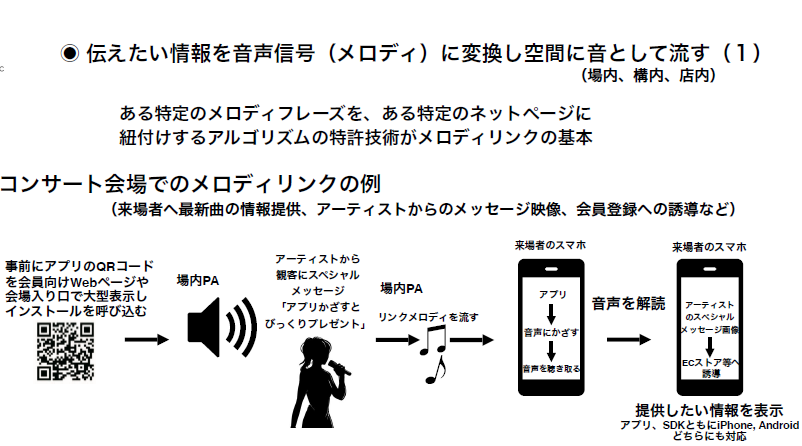
Concert venue
Providing attendees with information on the latest songs, showing video messages from artists, encouraging membership registration, etc.
The core of Melody Link is a patented algorithm that links specific melodic phrases to specific web pages.
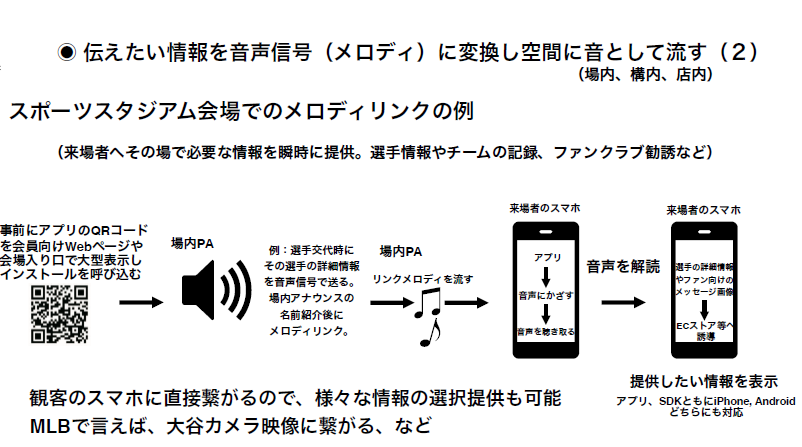
Sports stadium venue
Instantly provide visitors with necessary information on the spot—such as player details, team records, and fan club sign-up information.
Since it connects directly to the audience’s smartphones, it is possible to selectively provide a variety of information.
User Guide
Install (Free)
- install
- At an event venue or similar location, press the “Start Listening” button in the app when the designated melody plays.
- When the melody is received, information linked to it (such as a website URL) is displayed on your smartphone.
Example
Examples of use
Event companies, etc.
Melody Link at the concert venue
- Display the app’s QR code prominently on the member webpage and at the venue entrance in advance to encourage installation.
- A special message from the artists to the audience: “Hold up the app for a surprise gift.”
- Play the “Link Melody” over the venue PA system.
- Press the “Start Listening” button in the app.
- When the melody is received, information linked to it (such as a website URL) is displayed on your smartphone.
Melody Link at the sports stadium venue
- Display the app’s QR code prominently on the member webpage and at the venue entrance in advance to encourage installation.
- When a player is substituted, detailed information about that player is transmitted via an audio signal. A melody plays following the in-stadium announcement of the player’s name.
- Play the “Link Melody” over the venue PA system.
- Press the “Start Listening” button in the app.
- When the melody is received, information linked to it (such as a website URL) is displayed on your smartphone.
Advertisements such as radio and TV shopping
- Encourage app installation in advance via web pages or programs.
- Play the melody for advertisers.
- When listeners receive the content via the app, they are directed to a designated online store or similar site.
Stamp Rally (Melody Rally)
- Display the app’s QR code prominently on the event announcement webpage and at the venue entrance in advance to encourage installations.
- Play the “Link Melody” at key locations (areas where you want to attract visitors).
- Receiving the notification via the app directs you to the stamp rally website for each designated location.
- The stamps support screenshots and web-based systems.
User Review
Contact
Please feel free to contact us via the information below regarding any questions or inquiries about the app.